Features How it works Formats Pricing Help
Mac · Workflow Capture

The automatic step-by-step guide creator.

Turn any process into a professional Standard Operating Procedure (SOP) or tutorial. StepGrab captures your screen at every click, adds numbered arrows, and generates the guide automatically — 100% locally on your Mac.

macOS 14.6+ · Free to try · No credit card required
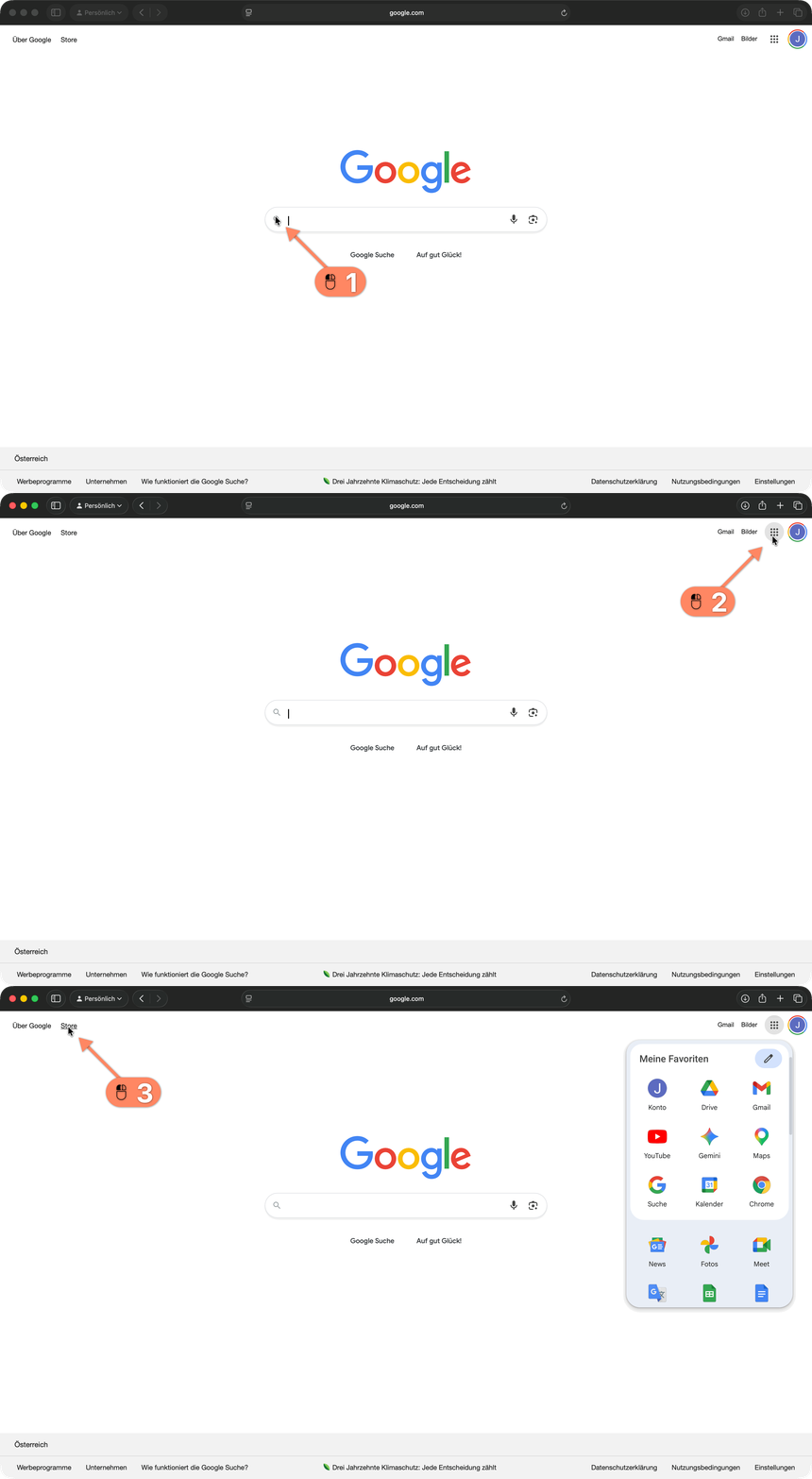
StepGrab step-by-step guide demo
GIF
PDF
Features

Everything you need. Nothing you don't.

Auto Capture

Just start recording and click through your workflow. StepGrab captures a screenshot at every click — automatically.

Smart Annotations

Numbered arrows are placed precisely where you clicked, so your audience always knows where to look.

Export in any format

Export your workflow as a PDF document, an animated GIF, or an MP4 video — ready to share in seconds.

Fully customizable

Choose your arrow color, size, and style. Set your save location, file naming, and export formats. StepGrab works your way.

Lives in your menu bar

StepGrab is always just one click away. No window clutter — start recording instantly from the menu bar.

Floating HUD

A lightweight overlay keeps you in control while recording — showing your step count and a live preview without getting in the way.

How it works

Three steps. One recording. Done.

1

Record

Click the menu-bar icon and run through your flow. Every click is captured as a clean screenshot, automatically numbered and annotated.

2

Refine

Rename steps, add captions, redact private text, reorder, and pick your arrow style — or just accept the smart defaults.

3

Share

Export the finished guide as PDF, GIF, or MP4 and drop it into a doc, ticket, or Slack thread. Done in seconds.

Perfect for: Employee Onboarding Standard Operating Procedures (SOPs) Customer Support Tutorials Software Documentation Bug Reporting Training Manuals See examples →
Formats

Export in any format.

Video
MP4

Full-motion recording with smooth cursor trails. Drop it into a doc, embed it, or share a link.

Animated
GIF

Looping preview clip. Perfect for product updates, Slack threads, and GitHub pull requests.

Document
PDF

Numbered, printable step-by-step guide. Captions and screenshots included.

Your screen never leaves your Mac.

100% local.
Nothing uploaded.
Ever.

100% Offline

Recordings, screenshots, and exports live only on your Mac. Nothing touches a server — ever.

Optional Sign In

No email, no password, no tracking. Sign in with Apple is optional — used only to sync your recording count via an anonymous Apple ID.

No Cloud Upload

Your screen never leaves your device. You decide what gets shared, and with whom.

Built with Apple's native StoreKit — no third-party analytics, no ad SDKs.
Pricing

Start free. Upgrade when you're ready.

Free
$0
Try it, no account required.
Up to 5 steps per recording
Up to 3 recordings
PDF & GIF export
MP4 export
No account required
Download
Pro · Yearly
$9.99/ year
~ $0.83 / month
Everything unlocked, billed yearly.
Unlimited steps
Unlimited recordings
PDF, GIF & MP4 export
All customization options
Priority support
Start Pro
Best value
Pro · Lifetime
$49.99once
Pay once. Own it forever.
Everything in Pro Yearly
All future updates
Pay once — no subscription
Lifetime priority support
Get Lifetime
App Store Reviews

What people are saying.

Loading reviews…
FAQ

Frequently asked questions.

No. StepGrab runs entirely on your Mac. Screenshots, recordings, and exports stay on your device — nothing is uploaded, analyzed, or shared without your explicit action. No account is required to use the app.

StepGrab is free to try on the Mac App Store — you can record your first few guides without an account. Pro unlocks unlimited recordings, MP4 export, and every customization option, available as a yearly subscription or a one-time Lifetime purchase.

StepGrab runs on macOS 14.6 and later, on both Apple Silicon and Intel Macs. You can download it directly from the Mac App Store — updates install automatically.

Every recording can be exported three ways: a numbered PDF guide (great for tickets and docs), an animated GIF (perfect for Slack and pull requests), or a full-motion MP4 video. Pick one, or export the same recording to all three.

Yes. After recording you can rename each step, add captions, reorder or delete steps, redact private text in screenshots, and tweak the arrow color, size, and style before exporting. Your original capture is never destructive.

Show, don't tell.

Free for your first 3 recordings. No account required.

Download on the Mac App Store
macOS 14.6+ · Free to try · No credit card required